
Free · nothing to install · no sign-up to try
Change the text in your PDF. Keep everything else.
Fix a date, a figure or a typo right where it is — then sign, highlight or add an image, and download a new PDF.
Drop a PDF here
or
PDFs under 5 MiB (25 MiB on Pro), up to 100 pages. No sign-up needed to try.
Edit the text that’s already there
The edit most PDF tools can’t make
Many online editors only let you type on top of a page. Here you change the words already in it — no Word file, no retyping the page — in the document’s own font whenever the file allows.
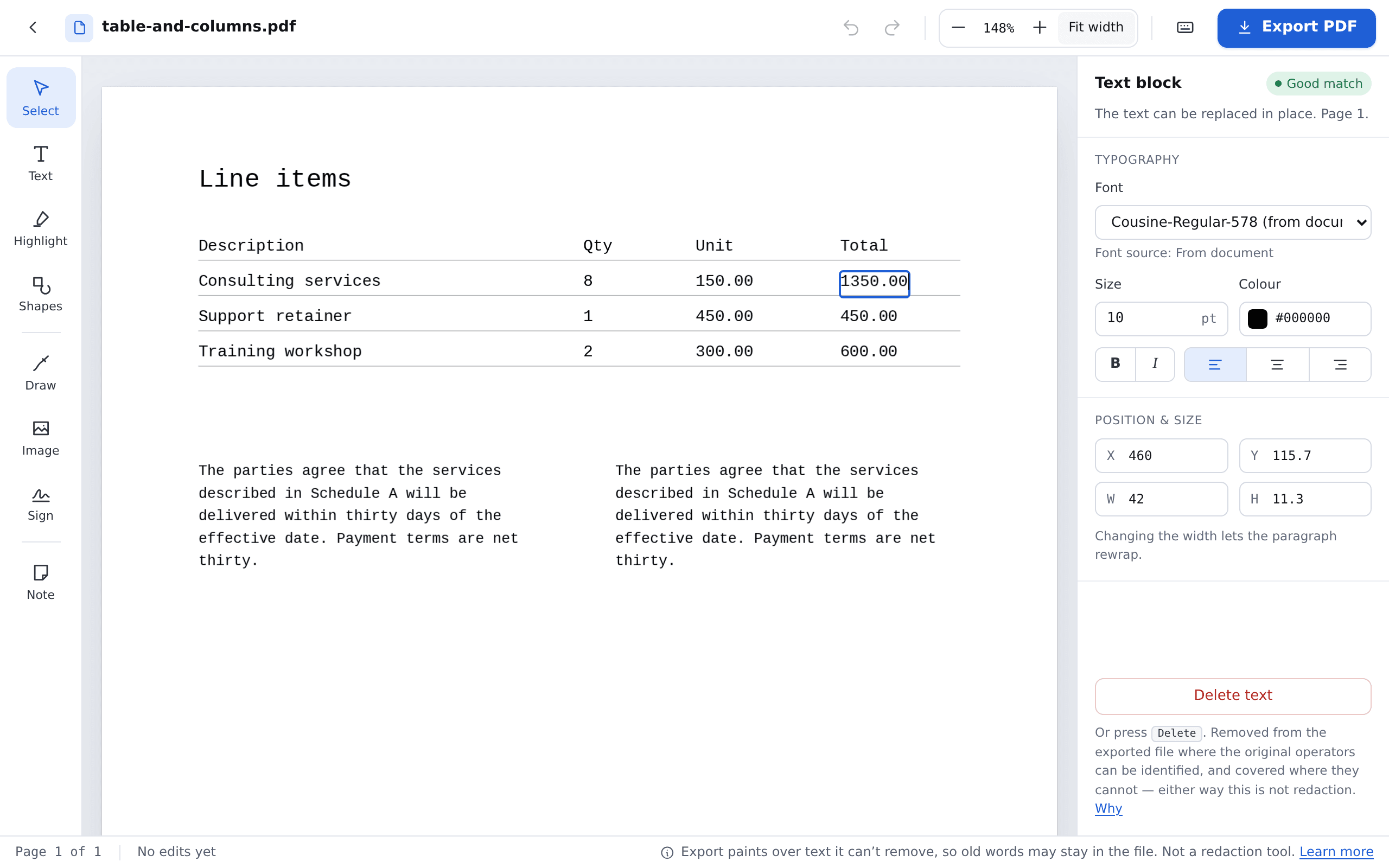
Know what will change before you start
Every piece of text is graded, from Good to Unsupported, before you type a word — so you know what will change cleanly. What the marks mean.
Matches the font that’s already there
New words use the document’s own font whenever the file allows. When it doesn’t, a substitute keeps the spacing close, and the editor shows where. When fonts change.
Your original is never touched
You download a new PDF. The file you uploaded is never overwritten, stays private, and is deleted when you delete it or when your plan’s retention period ends. How files are handled.
Everything else, in the same editor
Sign it, mark it up, make it yours
Every tool is on every plan, the free one included — no upgrade to unlock a button.
Sign it
Draw your signature once and place it on the line, and sign in to keep it for next time. It’s a drawn signature, not a certificate-based digital one.
Add text anywhere
Click the page and type: a missing line, a date beside your signature, a reference number in the margin.
Add an image
Add a PNG or JPEG — a logo, a stamp, a photo — then move and resize it on the page.
Highlight what matters
Click a line to drop a highlight on it, then stretch it to fit — in the colour you choose.
Draw freehand
Circle a figure, tick a box, underline a clause — with the pen colour and weight you pick.
Boxes, circles and arrows
Rectangles, ellipses, lines and arrows, with your own stroke and fill.
Leave a note
A sticky note on the page itself, drawn into the PDF you download, so everyone who opens it sees it.
Move or delete what’s there
With the Select tool, move, resize or delete the images and graphics already in the PDF — an old logo, a stray stamp — wherever the file allows. Deleting takes it off the page, but its data stays in the file: this is not redaction.
Try them on your own PDF
Upload a file and every tool is in the rail on the left. No account to start.
Upload a PDF
How it works
From upload to a new PDF in three steps
- 1
Upload your PDF
Nothing to install and no account to start. It opens straight in the editor.
- 2
Edit, sign, mark it up
Double-click text to change it, or pick a tool from the rail — on a computer’s browser. You see straight away which text can be changed cleanly.
- 3
Download the new PDF
Sign in for free and download it. The file you uploaded stays exactly as it was.
Where it helps
The little jobs that come up all the time
A contract with the wrong date
Change the date or a name right where it is. The rest of the page stays where it was.
An invoice with a wrong figure
Correct a total or a reference number without going back to whoever issued it.
A letter with a typo
Fix a misspelt name or address in the letter’s own font where the file allows it, and a close match where it does not.
An agreement to sign and send back
Draw your signature, put it on the line, add the date beside it, and download the signed copy — no printer, no scanner.
Good to know
What it can’t do, up front
Some PDFs can’t be changed cleanly here. We’d rather you knew now than after you upload:
- PDFs must be smaller than 5 MiB (25 MiB on Pro) and at most 100 pages.
- Scanned PDFs cannot be edited. You can still view and download them.
- A password-protected PDF needs its password. We use it once to unlock the file and keep the unlocked copy, so it is no longer password-protected here.
- Editing a digitally signed PDF invalidates the signature.
- Editing removes the old text where it can prove which instructions drew it and paints over it where it cannot, so the exported file may still contain the old words. This is not redaction.
Removing something sensitive? Keep the last point in mind. Whether the old text is removed or only covered depends on the file, and the exported file may still contain the old words either way. The same goes for an image or graphic you delete: it leaves the page, not the file.
Free to edit, no card. Edit without an account; exporting needs a free account (a verified email address, or Google sign-in) and includes 3 exports a month. Pro is US$5.99 a month, excluding tax, for unlimited exports within fair use. Plans and pricing.
Your file stays yours. Stored privately, kept for one day without an account and 7 days on a free account, and never used for advertising or model training. Privacy policy.
Common questions
Questions people ask first
How large a PDF can I edit?
Under 5 MiB without an account or on the free plan, and under 25 MiB on Pro, up to 100 pages either way — the sizes we have load tested. A text-heavy contract of 100 pages fits easily; the files that run larger are usually scans or photos, and a scan’s text cannot be edited anyway.
Why won’t some of my text change?
Usually one of five reasons: the page is a scanned picture, the file doesn’t record which letters its characters are, the words sit in a form field, or the letters were turned into shapes. The fifth still lets you edit: on a busy background, a change may leave a visible patch. When you open your file, you see which text can be changed and why some can’t. How to tell them apart.
Can I sign a PDF here?
Yes — draw your signature and place it anywhere on the page. With a free account you can keep up to 5 to reuse. It’s a drawn signature, not a certificate-based digital signature, and editing a PDF that already carries a digital signature invalidates that signature.
Can I add images, highlights or notes?
Yes. Add a PNG or JPEG, highlight lines, draw freehand, add boxes, circles and arrows, or leave a note on the page — and move, resize or delete the images and graphics already in the file where it allows. Notes are drawn onto the page, so everyone who opens the PDF sees them. Deleting an image takes it off the page, but its data stays in the file, so it is not a way to hide something.
Can I edit a scanned document?
No. A scan is a photo of a page, with no text in it to change. We don’t try to read text out of images (OCR), and we’ll tell you plainly when a file is scanned rather than guessing. Telling the two kinds apart.
Will my fonts change?
Sometimes. Your edit uses the document’s own font whenever the file allows — but PDFs often carry only the letters they already use. When a letter is missing, you get a substitute chosen to keep the spacing close. The editor shows which text uses one. Why that happens.
Do I need an account?
Not to try it: upload and edit straight away. Downloading the edited PDF needs a free account — a verified email address or Google sign-in — which includes 3 exports a month, or Pro for unlimited exports within fair use. Plans and pricing.
What happens to my file?
It is stored privately, never used for advertising or model training, and deleted when you delete it or when your plan’s retention period ends. See the privacy policy.
Got a PDF to fix, sign or mark up?
Drop a PDF here
or
PDFs under 5 MiB (25 MiB on Pro), up to 100 pages. No sign-up needed to try.